Complete Guide 2026
End-to-End
Software Development
Software Development
with Agile + DevOps
From idea to production and beyond — a comprehensive guide to modern software delivery integrating Agile methodology and DevOps practices at every phase.
Plan
→
Code
→
Build
→
Test
→
Release
→
Deploy
→
Monitor
↻
8
Phases
25
Min Read
E2E
Coverage
Purpose of This Session
🎯 Learning Goal
Put you on the first steps of becoming
Software Engineers
by understanding
Agile Software Development
📋
Plan
Requirements & User Stories
⚡
Build
Architecture, Code & Test
🚀
Ship
CI/CD & Deployment
📊
Operate
Monitor & Improve
💡
By the end of this session
You'll understand how modern teams deliver software — from a raw idea to a running production system, with feedback loops at every step.
Agenda
🏗️
Section 1
Software Engineering
🔄
Section 2
Agile Software Development
🏃
Section 3
SCRUM
📊
Section 4
Lean and Kanban
♾️
Section 5
DevOps
🎯
Section 6
Conclusion
Section 1 of 6
Software Engineering
The foundation of building reliable, scalable, and maintainable software systems.
Art, Science and Engineering
Every discipline goes through the same evolution...
→
→
💡 Software development followed this exact path — from creative hacking to computer science to software engineering
The Bread-Making Analogy 🍞
Let's understand this evolution through something we all know — making bread.
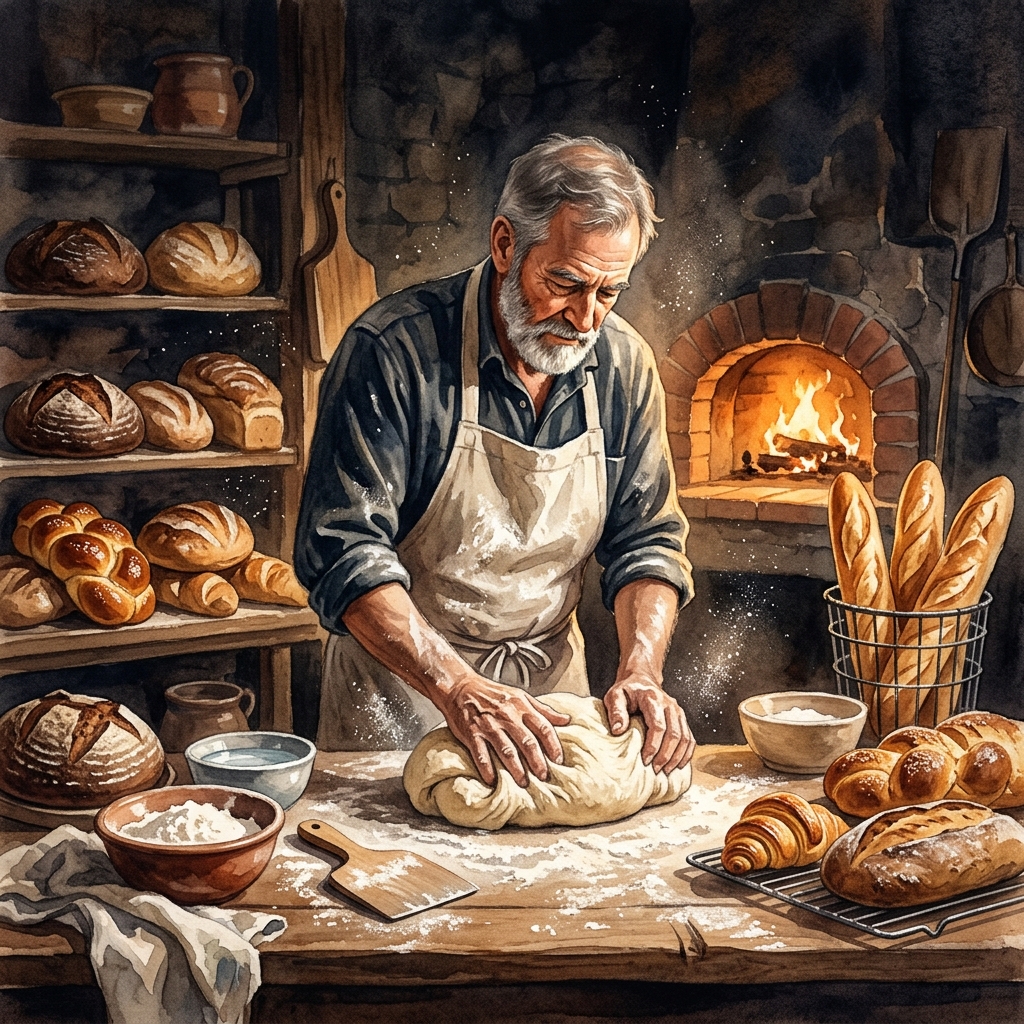
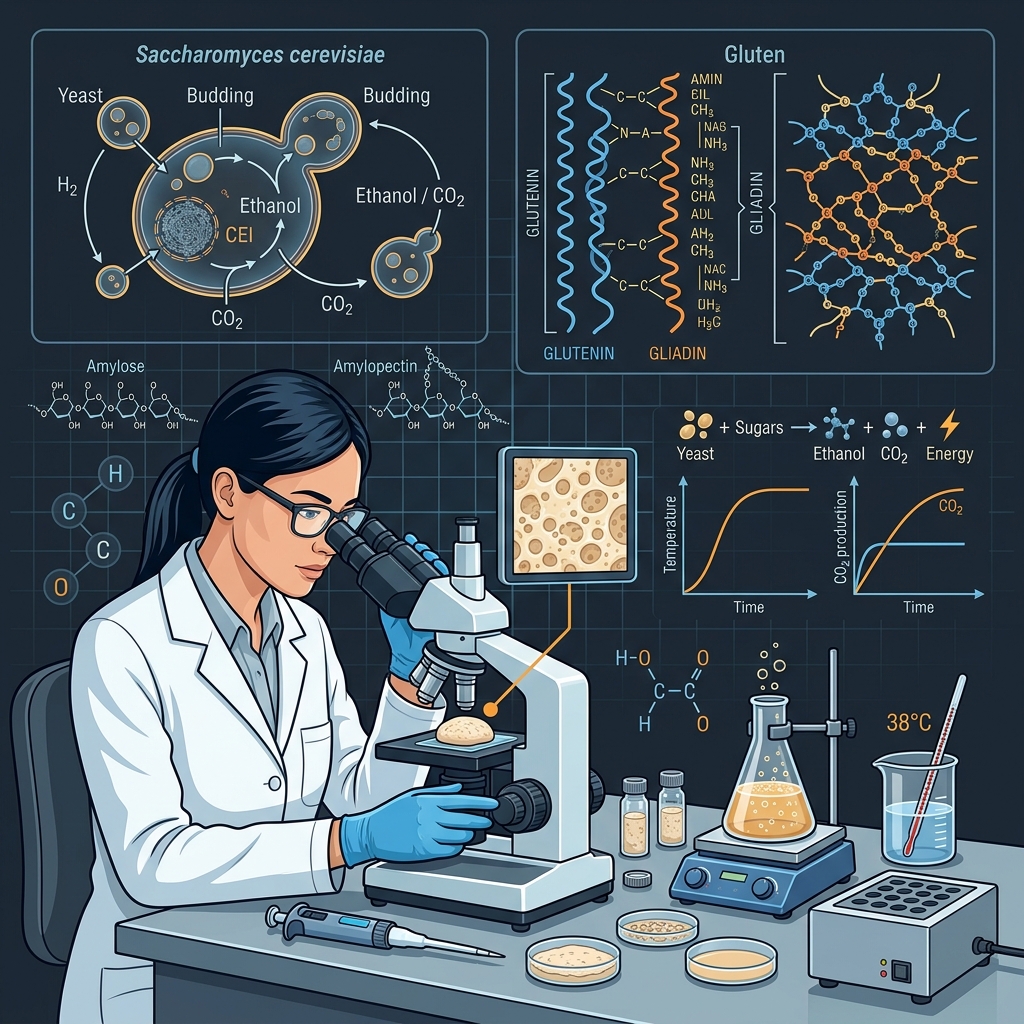
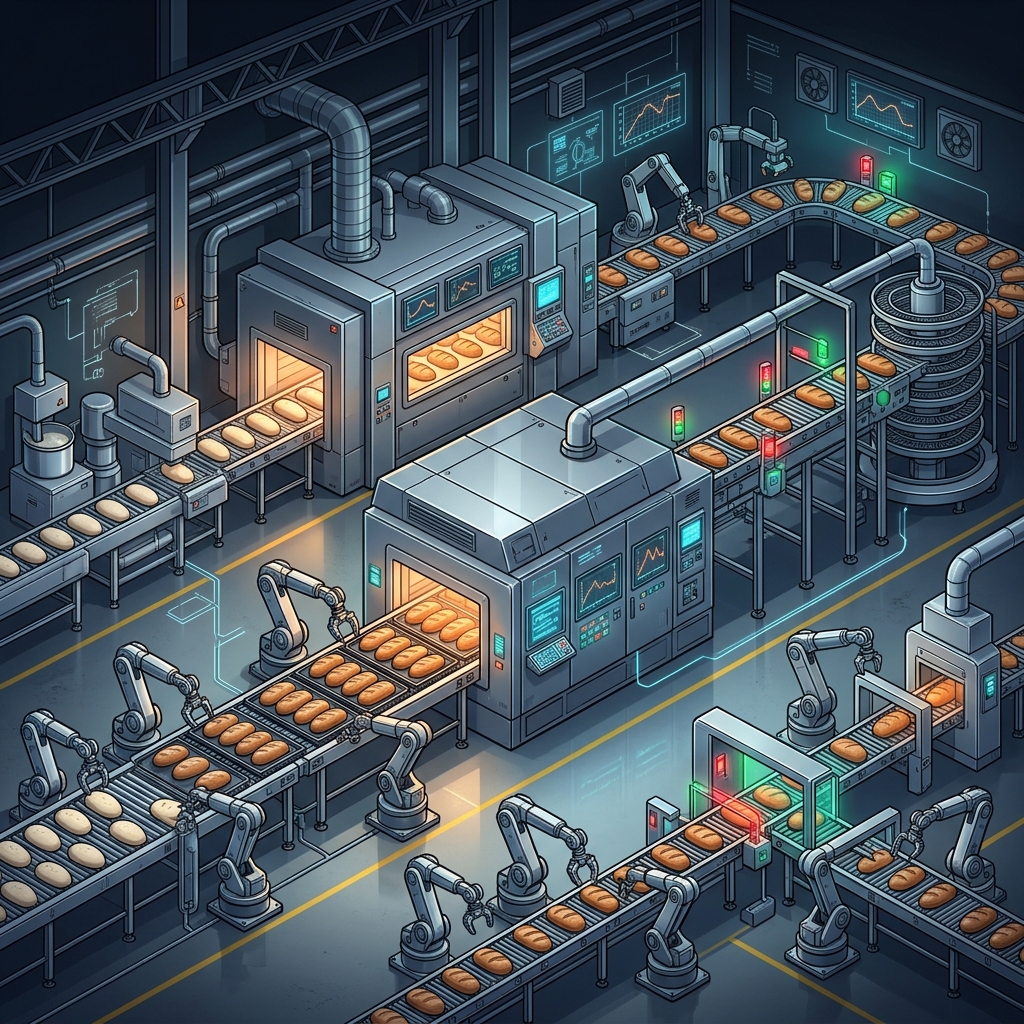
🍞
→
💻
Same journey: from hacking code in a garage to engineering systems at scale
Art — Baking by Intuition 🎨
In the beginning, everything is art — pure creativity and instinct.
🤲
Intuition — "A pinch of this, a handful of that"
✨
Unique — Every result is different, unrepeatable
👀
Apprenticeship — Skills passed by watching & doing
❌
No standards — No measurement, no documentation
🎨 Like early programmers — coding by feel, no version control, no process.
Science — Documenting Knowledge 📚

When craft becomes science, people start writing it down.
📖
Cookbooks — Documenting recipes & techniques
🔬
Research — Understanding yeast, gluten, fermentation
📏
Standards — Exact measurements, temperatures, timing
🔄
Reproducible — Anyone can follow and get results
💡 Knowledge is no longer trapped in one person's head — it's shared.
Engineering — Best Practices & Standards ⚙️
When science becomes engineering, we create standards & best practices.
👨🍳
What a cook should wear?
Uniforms, hygiene standards, safety gear
🏗️
How the kitchen should be organized?
Workflow layout, station design, mise en place
🍳
Best kitchenware to use?
Right tools for the right job, quality standards
📦
How to buy and store ingredients?
Supply chain, storage protocols, quality checks
So, What is Software Engineering?
📋 Specification
📐 Design
💻 Development
✅ Validation
🔄 Evolution
Not just coding — it's the entire lifecycle from idea 💡 to retirement 🏁
Programmer, Software Developer & Software Engineer
Three related but distinct roles — each with a different scope of responsibility.
Code
⊂
Code + Product
⊂
Code + Product + Engineering
Computer Science vs Software Engineering
💡 CS asks "Can this be computed?" — SE asks "How do we build it reliably for real users?"
Software Process
Specification
→
Development
→
Validation
→
Evolution
🔁
Software Development Methodologies
A Software Process Model is a simplified representation of a software process. Each model represents a process from a particular perspective.
Waterfall Model 🏔️
The original software process model — phases flow sequentially downward like a waterfall.
📋
Requirements Definition
Establish services, constraints, and goals with users
▼
📐
System & Software Design
Allocate requirements to systems, establish architecture
▼
💻
Implementation & Unit Testing
Develop and verify individual program units
▼
🧪
Integration & System Testing
Integrate units and test the complete system
▼
🚀
Operation & Maintenance
Deploy, fix errors, and enhance the system
⚠️ Each phase must be signed off before the next phase begins — going back is costly and difficult.
Disadvantages of Waterfall ⚠️
💡 These problems led the industry to seek better approaches — enter Agile methodologies.
The Communication Problem 🎯
When phases are isolated and handoffs are rigid, every stakeholder ends up with a different understanding of the same product.
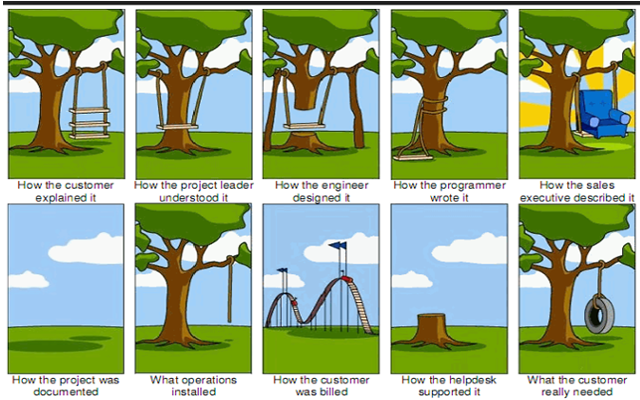
💡 This is exactly what happens when requirements are frozen early and feedback comes too late — the classic Waterfall trap.
Section 2 of 6
Agile Software Development
A better way to build software — embracing change, collaboration, and continuous delivery.
The Birth of Agile 📜
In February 2001, 17 software developers met at a ski resort in Snowbird, Utah to discuss lightweight development methods.
Agile Values Explained
The 12 Agile Principles
1
Customer Satisfaction
Highest priority through early and continuous delivery of valuable software
2
Welcome Change
Harness change for the customer's competitive advantage, even late in development
3
Deliver Frequently
Deliver working software frequently, from weeks to months, preferring shorter timescales
4
Work Together
Business people and developers must work together daily throughout the project
5
Motivated People
Build projects around motivated individuals, give them support and trust them
6
Face-to-Face
The most effective method of conveying information is face-to-face conversation
7
Working Software
Working software is the primary measure of progress
8
Sustainable Pace
Promote sustainable development — sponsors, developers, and users maintain a constant pace
9
Technical Excellence
Continuous attention to technical excellence and good design enhances agility
10
Simplicity
Maximizing the amount of work not done — the art of simplicity is essential
11
Self-Organizing
The best architectures and designs emerge from self-organizing teams
12
Reflect & Adjust
Regularly reflect on how to become more effective, then tune and adjust behavior
Waterfall vs Agile ⚔️
Two fundamentally different approaches to building software.
🏔️
Waterfall
Plan-Driven
✕
Big upfront planning
✕
Sequential phases
✕
Late testing
✕
Change is costly
✕
Deliver once at the end
✕
Customer sees product late
VS
🔄
Agile
Value-Driven
✓
Just enough planning
✓
Iterative cycles (sprints)
✓
Continuous testing
✓
Change is welcomed
✓
Deliver every 1–4 weeks
✓
Customer involved always
💡 Agile doesn't mean no planning — it means continuous planning with fast feedback loops.
Incremental Development 🔄
Instead of delivering everything at once, incrementally build and deliver the system in small, working pieces.
SPRINT 1
Week 1-2
📋
Core Features
Login, basic navigation, data model
SPRINT 2
Week 3-4
⚡
Enhanced Features
Search, filters, user dashboard
SPRINT 3
Week 5-6
🔔
Notifications & Reports
Email alerts, PDF exports, analytics
SPRINT 4
Week 7-8
🚀
Polish & Launch
Performance, security, production deploy
💡 Each sprint delivers a working, usable increment — the customer gets value from day one, not month six.
Benefits of Agile ✅
⚡
Faster Time-to-Market
Ship working features every sprint instead of waiting months for a big release
🎯
Lower Risk
Problems are discovered early through continuous feedback and testing
😊
Higher Satisfaction
Customers see progress continuously and can steer the product direction
🔧
Better Quality
Continuous testing and refactoring keep technical debt under control
🤝
Team Morale
Empowered, self-organizing teams with sustainable pace and clear ownership
📊
Transparency
Everyone knows what's being built, what's done, and what's next
💡 But adopting Agile isn't always easy — especially when clients and contracts aren't Agile-ready.
Biggest Challenge to Agility ⚠️
Fixed contracts with Non-Agile clients:
💰
Fixed Cost
Budget is locked before the project starts
📐
Fixed Scope
Every feature is defined upfront — no room for change
⏰
Fixed Time
Deadline is set regardless of complexity or changes
⏰
time
💰
cost
📦
product
scope
quality
⚠️ When all three are fixed, quality suffers. Agile fixes time and cost but keeps scope flexible — prioritizing what matters most.
Agile Methodology Adoption 📊
Which Agile methodology do teams actually use? Scrum dominates — but many teams blend approaches.
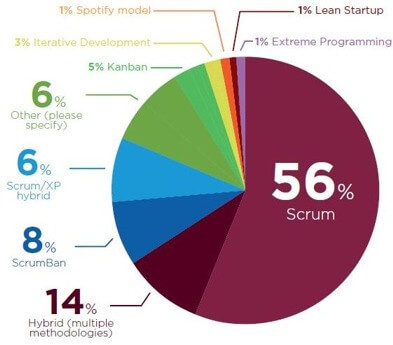
🥇 Scrum — 56%
🥈 Hybrid — 14%
🥉 ScrumBan — 8%
📋 Kanban — 5%
Summary: Section 2
🚀 Next up: Section 3 — SCRUM — the most popular Agile framework in practice.
Section 3 of 6
SCRUM
The most widely adopted Agile framework — lightweight, iterative, and built around empowered teams.
What is Scrum?
🪶 Lightweight
🧩 Simple to understand
🏋️ Difficult to master
The Scrum Framework Overview
Scrum is built on three pillars and consists of roles, events, and artifacts.
👁️
Transparency
The process and work must be visible to everyone doing the work and receiving the work
🔍
Inspection
Scrum artifacts and progress must be inspected frequently to detect problems early
🔧
Adaptation
If any aspect deviates outside acceptable limits, the process must be adjusted as soon as possible
💡 These three pillars form the foundation of empirical process control — learn by doing, inspect, and adapt.
Scrum Roles 👥
A Scrum Team is small, cross-functional, and self-managing. No sub-teams, no hierarchies.
Scrum Artifacts 📋
Artifacts represent work or value — designed to maximize transparency of key information.
📜
Product Backlog
OWNED BY PO
An ordered list of everything that is needed in the product. The single source of requirements — constantly refined and reprioritized.
📝
Sprint Backlog
OWNED BY DEVS
The set of Product Backlog items selected for this sprint, plus a plan for delivering the Increment and achieving the Sprint Goal.
📦
Increment
POTENTIALLY SHIPPABLE
The sum of all completed Product Backlog items during a Sprint — must meet the Definition of Done and be usable.
Scrum Events 📅
All events are time-boxed and happen within the Sprint — creating regularity and minimizing meetings.
🔄
The Sprint
1–4 WEEKS
A fixed-length timebox that contains all other events
📋
Sprint Planning
What can be done? How will it be done?
☀️
Daily Scrum
Sync, inspect progress, adapt today's plan
🎯
Sprint Review
Demo the increment, gather stakeholder feedback
🪞
Sprint Retrospective
What went well? What to improve? Action items.
📦
Deliver Increment
→
Next Sprint begins immediately
🔄
The Sprint Cycle 🔄
Each sprint is a mini-project that produces a usable, potentially releasable Increment.
📜
Product Backlog
Prioritized wish list
→
📋
Sprint Planning
Select items
→
🏃
Sprint
1–4 weeks of work
☀️ Daily Scrum
→
🎯
Review + Retro
Inspect & adapt
→
📦
Increment
Shippable product
🔁
Repeat every sprint — continuous improvement
User Stories 📝
The building blocks of the Product Backlog — written from the user's perspective.
💡 Example
As a registered customer,
I want to filter products by category,
so that I can find what I need quickly.
Definition of Done ✅
A shared understanding of what it means for work to be complete. Without it, "done" is meaningless.
✅
Example DoD Checklist
☑ Code complete & peer reviewed
☑ Unit tests written & passing
☑ Integration tests passing
☑ No critical bugs
☑ Documentation updated
☑ Deployed to staging
☑ Product Owner accepted
⚠️
Without DoD...
✕ "Done" means different things to everyone
✕ Hidden technical debt accumulates
✕ Bugs go to production
✕ Sprint velocity becomes unreliable
✕ Stakeholders lose trust in delivery
💡 The DoD is a quality gate — it protects the team, the product, and the customer.
Summary: Section 3
🚀 Next up: Section 4 — Lean and Kanban — optimizing flow and eliminating waste.
Section 4 of 6
Lean & Kanban
Optimize flow, eliminate waste, and deliver value continuously — inspired by Toyota's manufacturing revolution.
What is Lean? 🏭
Born from Toyota's Production System in the 1950s — adapted for software development.
7 Principles of Lean Software
🗑️
Eliminate Waste
Remove anything that doesn't add value
📚
Amplify Learning
Learn through rapid iterations
⏰
Decide Late
Keep options open as long as possible
🚀
Deliver Fast
Short cycles, small batches
💪
Empower the Team
Trust people closest to the work
🏗️
Build Integrity In
Quality is built in, not inspected later
🔭
Optimize the Whole
Think systems, not local optimizations
What is Kanban? 📊
Kanban (看板) means "visual signal" — a method to visualize work, limit WIP, and optimize flow.
Kanban Core Practices
👁️
Visualize Work
Make all work visible so the team can see bottlenecks at a glance
🚦
Limit WIP
Cap work in progress to prevent overload and improve focus
🌊
Manage Flow
Monitor and optimize flow of work through the system
💡 Kanban has no sprints, no roles, no timeboxes — it's about continuous flow and evolutionary change.
Scrum vs Kanban
🏃
Scrum
• Fixed-length sprints
• Defined roles (PO, SM, Dev)
• Sprint backlog is locked
• Velocity as metric
• Prescribed ceremonies
VS
📊
Kanban
• Continuous flow
• No prescribed roles
• New items can enter anytime
• Lead time as metric
• Evolve existing process
💡 Many teams use ScrumBan — combining Scrum's structure with Kanban's flow.
Section 5 of 6
DevOps
Bridging Development and Operations — culture, automation, and continuous delivery at scale.
What is DevOps?
Dev = Development
♾️ DevOps
Ops = Operations
Why DevOps? 🤔
Traditional teams work in silos — DevOps breaks the wall between Dev and Ops.
🚫
Without DevOps
Slow releases, manual deploys, blame culture, long feedback loops
✅
With DevOps
Fast releases, automated pipelines, shared ownership, rapid feedback
46x
More frequent deploys
440x
Faster lead time
170x
Faster recovery (MTTR)
5x
Lower change failure rate
These numbers are from the DORA State of DevOps Report — elite teams consistently outperform on all four metrics.
DevOps Culture — CALMS 🧠
DevOps is not just tools — it is a cultural transformation.
🤝
Culture
Shared responsibility between Dev and Ops — no blame, no silos
⚙️
Automation
Automate everything repeatable: build, test, deploy, monitor
🎯
Lean
Small batches, eliminate waste, continuous improvement
📊
Measurement
Data-driven decisions — measure lead time, MTTR, failure rate
💬
Sharing
Blameless postmortems, knowledge sharing, open communication
CALMS was coined by Jez Humble (co-author of Continuous Delivery) — culture eats tools for breakfast.
The DevOps Infinity Loop ♾️
A continuous cycle of building, testing, deploying, and monitoring.
📋
Plan
Requirements, user stories, backlog
💻
Code
Develop, review, version control
🔨
Build
Compile, package, CI pipeline
🧪
Test
Automated tests, Staging Server gates
🚀
Release
Approval, staging, release notes
📦
Deploy
CD pipeline, infrastructure as code
⚙️
Operate
Run, scale, manage infra
📊
Monitor
Logs, metrics, alerts, feedback
♾️ Continuous loop — feedback from Monitor flows back into Plan
CI/CD Pipeline 🔧
The backbone of DevOps — automating the journey from code commit to production.
CI — Continuous Integration
💻
Code Commit
→
🔨
Build
→
🧪
Unit Tests
→
✅
Merge
CD — Continuous Delivery
🧪
Integration Tests
→
📦
Staging
→
🚀
Production
📊 Monitor → Feedback → Iterate
DevOps Tools Ecosystem 🧰
The DevOps toolchain — powerful tools that automate every stage of the software delivery lifecycle.
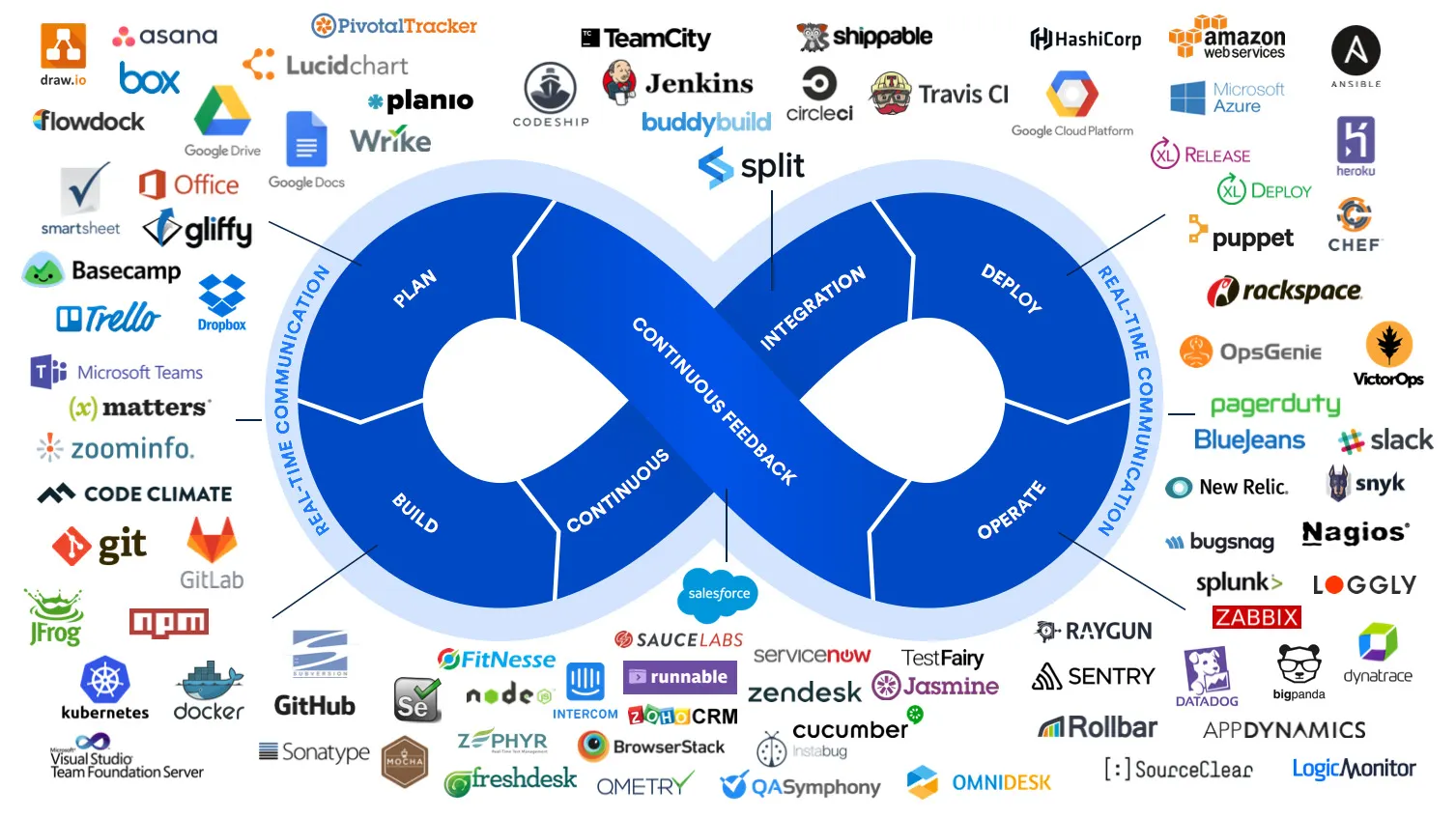
📋 Plan
💻 Code & Build
🧪 Dev Server & Staging Server
🚀 Deploy
📊 Monitor
DevOps Key Practices
🏗️
Infrastructure as Code
Manage infra with code: Terraform, Ansible, Pulumi
🐳
Containerization
Docker containers for consistent environments
☸️
Orchestration
Kubernetes for scaling and managing containers
📊
Monitoring & Logging
Prometheus, Grafana, ELK Stack
🔄
GitOps
Git as single source of truth for deployments
🛡️
DevSecOps
Security integrated into every pipeline stage
Version Control & Branching 🌿
How teams organize code — the right branching strategy depends on your team size and release cadence.
🌳
Branching Strategy
Feature Develop Release Production
Branching lets teams work on features, fixes, and releases in parallel without breaking production — the backbone of team collaboration.
Testing Pyramid 🧪
A balanced test strategy — more unit tests, fewer E2E tests, for fast and reliable feedback.
🌐
E2E Tests
Slow • Expensive • Few
Selenium • Cypress • Playwright
🔗
Integration Tests
Medium speed • API contracts • Moderate
Postman • REST Assured • TestContainers
✅
Unit Tests
Fast • Cheap • Many (70–80%)
JUnit • Jest • xUnit • PyTest
Aim for 70% unit, 20% integration, 10% E2E — the "ice cream cone" anti-pattern is the opposite.
Code Review & Pull Requests 🔍
Every change goes through peer review before merging — the last human gate before automation.
📝
Create PR
• Describe what and why
• Keep PRs small (< 400 lines)
• Link to ticket/issue
👀
Review
• Check logic, not just style
• Suggest, don’t dictate
• Approve or request changes
✅
Merge
• CI passes all checks
• At least 1 approval
• Auto-deploy to staging
GitHub PRs
GitLab MRs
SonarQube
CodeClimate
Containerization 🐳
Docker packages your app with its dependencies — solving the "works on my machine" problem forever.
🚫
Without Containers
❌ "Works on my machine!"
❌ Different OS, libs, versions
❌ Manual server setup
❌ Hours to deploy
→
🐳
With Docker
✅ Same everywhere: dev, CI, prod
✅ Dockerfile = reproducible build
✅ Isolated, lightweight, portable
✅ Seconds to deploy
Dockerfile
→
docker build
→
Image
→
🚀 Deploy anywhere
Docker + Kubernetes = run thousands of containers at scale. K8s handles scaling, healing, and rolling updates automatically.
Infrastructure as Code 🏗️
Manage servers, networks, and databases with code instead of clicking through consoles.
🖱️
Manual Setup
❌ Click-through cloud consoles
❌ No history of changes
❌ Unique snowflake servers
❌ Hours to recreate
→
💻
Infrastructure as Code
✅ Declarative config files
✅ Version controlled (Git)
✅ Reproducible environments
✅ Minutes to recreate
🌍
Terraform
Multi-cloud IaC — AWS, GCP, Azure in one language (HCL)
📦
Ansible
Agentless config management — YAML playbooks over SSH
☸️
Kubernetes
Container orchestration — declare desired state, K8s makes it happen
🔄
GitOps
Git as single source of truth — ArgoCD, FluxCD auto-sync
Deployment Strategies 🚀
Safe ways to release to production — choose based on your risk tolerance and infrastructure.
🟦
Blue/Green
Two identical environments — switch traffic instantly. Zero downtime, easy rollback.
🐦
Canary Release
Roll out to 5–10% of users first — monitor, then expand. Used by Netflix and Google.
🔄
Rolling Update
Replace instances one by one — gradual rollout with no extra infra. K8s default.
🚩
Feature Flags
Deploy code but toggle features on/off — decouple deployment from release. LaunchDarkly.
Elite teams combine trunk-based dev + feature flags + canary releases for maximum safety and speed.
DORA Metrics 📊
The 4 key metrics from Google DORA research that separate elite teams from the rest.
DORA research (Accelerate book) proves that speed and stability are NOT trade-offs — elite teams excel at both.
Observability — Three Pillars 🔭
You cannot fix what you cannot see. Observability goes beyond monitoring — it lets you ask new questions.
Modern teams use OpenTelemetry as a unified standard for all three pillars — vendor-neutral and cloud-native.
DevOps — Common Mistakes ⚠️
❌
Buying tools without changing culture — tooling alone is not DevOps
❌
No automated tests in the pipeline — CI without tests is just continuous building
❌
Manual deployments to production — humans are the slowest and most error-prone step
❌
Ignoring security until the end — shift left with DevSecOps from day one
✅
Amazon deploys every 11.7 seconds — possible only with full automation and trust
Summary: Section 5
🚀 Next up: Section 6 — Summary & Conclusion — wrapping up the complete SDLC journey.
Section 6 of 6
Summary & Conclusion
Wrapping up everything we've learned — from software engineering fundamentals to modern DevOps practices.
The Journey We've Taken 🗺️
🏗️
Section 1 — Software Engineering
Art → Science → Engineering • Software Process • Waterfall & its limitations
🔄
Section 2 — Agile Software Development
Manifesto • 4 Values • 12 Principles • Incremental Delivery
🏃
Section 3 — SCRUM
3 Pillars • 3 Roles • Artifacts • Events • User Stories • DoD
📊
Section 4 — Lean & Kanban
7 Lean Principles • Kanban Board • WIP Limits • Flow
♾️
Section 5 — DevOps
CI/CD • IaC • Containers • Monitoring • GitOps • DevSecOps
Key Takeaways 🎯
💡
Software is Engineering
Building software is not just coding — it's a discipline covering the entire lifecycle from specification to evolution.
🔄
Embrace Change
Agile teaches us that change is inevitable and welcome. Fast feedback loops beat perfect upfront planning.
🤝
People Over Process
The best tools and frameworks are useless without collaboration, trust, and communication within the team.
♾️
Automate Everything
DevOps and CI/CD ensure that building, testing, and deploying is fast, reliable, and repeatable.
Thank You! 🎉
🚀
You're Ready to Build
Software the Modern Way!
Software the Modern Way!
From understanding the foundations of software engineering to mastering Agile, Scrum, Lean, and DevOps — you now have the knowledge to start your journey as a modern software professional.
📚 Keep Learning
💻 Start Building
🤝 Collaborate
Sindika Learn — End-to-End Software Development with Agile DevOps
© 2026